SQUARE ROOT SYMBOL
The Square Root Symbol √ — What It Means, How to Type It Anywhere
The square root symbol — written √ — is the mathematical notation used to indicate that you want the square root of whatever number or expression follows it. When you write √9, you are asking: "What non-negative number multiplied by itself equals 9?" The answer is 3.
What Is the Square Root Symbol?
The square root symbol — written √ — is the mathematical notation used to indicate that you want the square root of whatever number or expression follows it. When you write √9, you are asking: "What non-negative number multiplied by itself equals 9?" The answer is 3.
The symbol is known by several names depending on context. In everyday math, most people call it the square root symbol or the square root sign. Mathematicians and textbook authors more formally call it the radical sign or radical symbol, from the Latin word radix, meaning "root." The whole expression — the symbol plus the number underneath it — is called a radical expression. The number sitting inside (under the bar) is called the radicand.
A quick note that matters: √9 gives you 3, not ±3. By international convention, the √ symbol always represents the principal (positive) square root. If a problem wants both roots, it writes ±√9 explicitly. This is one of the most common points of confusion in algebra, so it's worth having clear from the start.
Anatomy of the Square Root Symbol
The √ symbol has three distinct visual parts that each carry meaning:
1. The radical sign (the hook/check mark) The angled hook at the front left is the core of the symbol. It is the part that actually signals "take the root." In typography it looks like a stylised checkmark, which is why students sometimes confuse √ (U+221A, the radical sign) with ✓ (U+2713, the check mark). They look similar but are entirely different characters. The easiest way to tell them apart: the radical sign is taller and leans more to the right, and it always has a horizontal line extending from its top-right.
2. The vinculum (the horizontal bar) The long horizontal line extending over the radicand is called the vinculum. It acts as a grouping symbol — everything under it is part of the radicand. This is critical for expressions like √(a + b), where both a and b are under the root. In plain text (a keyboard or simple word processor), the vinculum cannot be reproduced. The character √ gives you the hook only. For expressions with multiple terms, you must use parentheses: √(a + b), or use an equation editor or LaTeX.
3. The index (the small number in the notch) When no number appears in the small notch at the top-left of the hook, the index is assumed to be 2 (square root). If a small 3 appears there, it is a cube root (∛); a small 4 gives a fourth root (∜). For general nth roots, the index is the number n. The plain √ character (U+221A) has no index slot — to show an index properly, use an equation editor or LaTeX (\sqrt[3]{x} for cube root).
| Part | Name | What it shows |
|---|---|---|
| ✓-shaped hook | Radical sign | "Take the root" |
| Horizontal bar over radicand | Vinculum | Grouping — everything under it is the radicand |
| Small number in top-left notch | Index | Which root (2 = square, 3 = cube, etc.) |
| Number/expression under bar | Radicand | The number whose root you want |
What Is the Square Root Symbol Called?
The square root symbol goes by multiple names. All of these refer to the same √ character:
- Radical sign (most formal; used in textbooks and university maths)
- Radical symbol
- Square root symbol (most common in everyday speech)
- Square root sign
- Root sign
- Surd (older British English; rarely used today)
In programming and spreadsheets, the equivalent is not a symbol but a function: sqrt() in most languages, Math.sqrt() in JavaScript, and =SQRT() in Excel and Google Sheets.
Unicode and Technical Details
The square root symbol has a precise identity in the Unicode standard:
| Property | Value |
|---|---|
| Unicode code point | U+221A |
| Unicode name | SQUARE ROOT |
| HTML entity (named) | √ or √ |
| HTML entity (decimal) | √ |
| HTML entity (hex) | √ |
| UTF-8 bytes | E2 88 9A |
| Unicode block | Mathematical Operators (U+2200–U+22FF) |
| Unicode category | Sm (Symbol, Math) |
| Added to Unicode | Version 1.1 (1993) |
| Windows Alt code | Alt + 251 (requires Num Lock + numeric keypad) |
| Mac shortcut | Option + V |
For cube root and fourth root, the neighbouring code points are:
| Symbol | Code Point | HTML Decimal |
|---|---|---|
| ∛ | U+221B | ∛ |
| ∜ | U+221C | ∜ |
There is also U+23B7 (⎷), which represents only the bottom part of the radical sign without a vinculum — used in some typesetting contexts.
History of the Square Root Symbol: Where Did √ Come From?
The story behind √ is one of the most satisfying etymological detours in mathematics, and no competitor covers it completely. Here is the full picture.
The Ancient Roots of "Root"
Mathematicians across many early cultures understood the concept of a square root long before they had a symbol for it. Babylonian clay tablets from around 1800 BCE show accurate approximations of √2 (they calculated it to at least five decimal places). But all of these civilisations wrote their calculations out in words or used abbreviations in their own scripts — they had no universal symbol.
The Latin radix and the Arabic Bridge
The Arabic word for square root, jadhir (جذر), means "root" — the same metaphor as in Latin. When European scholars translated Arabic mathematical texts in the 12th and 13th centuries, they rendered jadhir as radix in Latin. By the 15th century, some European mathematicians were abbreviating radix as an ornate lowercase R with a tail, written before the number.
There are actually two competing theories about where the hooked shape of √ comes from: 1. The Latin "r" theory (favoured by Euler and most historians): the hook is a stylised lowercase r for radix. 2. The Arabic letter theory: some scholars argue it derives from the Arabic letter jīm (ج), the first letter of jadhir.
The r-for-radix explanation has stronger documentary support and is the consensus view today.
1525 — Christoph Rudolff Prints the Modern √
The first printed appearance of the √ symbol in anything close to its modern form came in 1525, when German mathematician Christoph Rudolff published Die Coss (the first German-language algebra textbook). Rudolff used a small hooked symbol that looked like a stylised lowercase r. It had no vinculum — the bar over the radicand had not yet been added.
This is the moment most historians mark as the birth of the modern radical sign.
1637 — René Descartes Adds the Vinculum
The symbol Rudolff introduced looked like just a hook. The long horizontal bar (vinculum) that extends over the radicand — the feature that visually groups the terms underneath — was added more than a century later.
In 1637, René Descartes published La Géométrie, in which he combined Rudolff's hook with the existing vinculum symbol (a bar used for grouping) to create the two-part symbol we use today: the hook plus the bar. This is the √ you see in every maths textbook worldwide.
Timeline Summary
| Year | Event |
|---|---|
| ~1800 BCE | Babylonians compute square roots without notation |
| 9th–12th c. | Arabic texts use jadhir; European translations use radix |
| 15th c. | Abbreviation r̄ (stylised R) used for radix by some European writers |
| 1525 | Christoph Rudolff prints √ (without vinculum) in Die Coss |
| 1637 | René Descartes adds the vinculum in La Géométrie |
| 1993 | U+221A formally encoded in Unicode 1.1 |
| Today | √ used universally in print, digital, and educational contexts |
How to Type the Square Root Symbol — Every Device and App
This section covers every common platform and tool. Jump to the one you need.
Windows (Any App)
Method 1 — Alt Code (fastest with a numpad) 1. Turn on Num Lock. 2. Hold Alt, type 251 on the numeric keypad (not the number row), release Alt. 3. √ appears.
This requires a full keyboard with a numeric keypad. Laptop keyboards without a dedicated numpad cannot use this method.
Method 2 — Windows Symbols Panel (laptops, Windows 10/11) 1. Press Win + . (period) or Win + ; to open the Emoji & Symbols panel. 2. Click the Ω (Symbols) tab. 3. Find and click √.
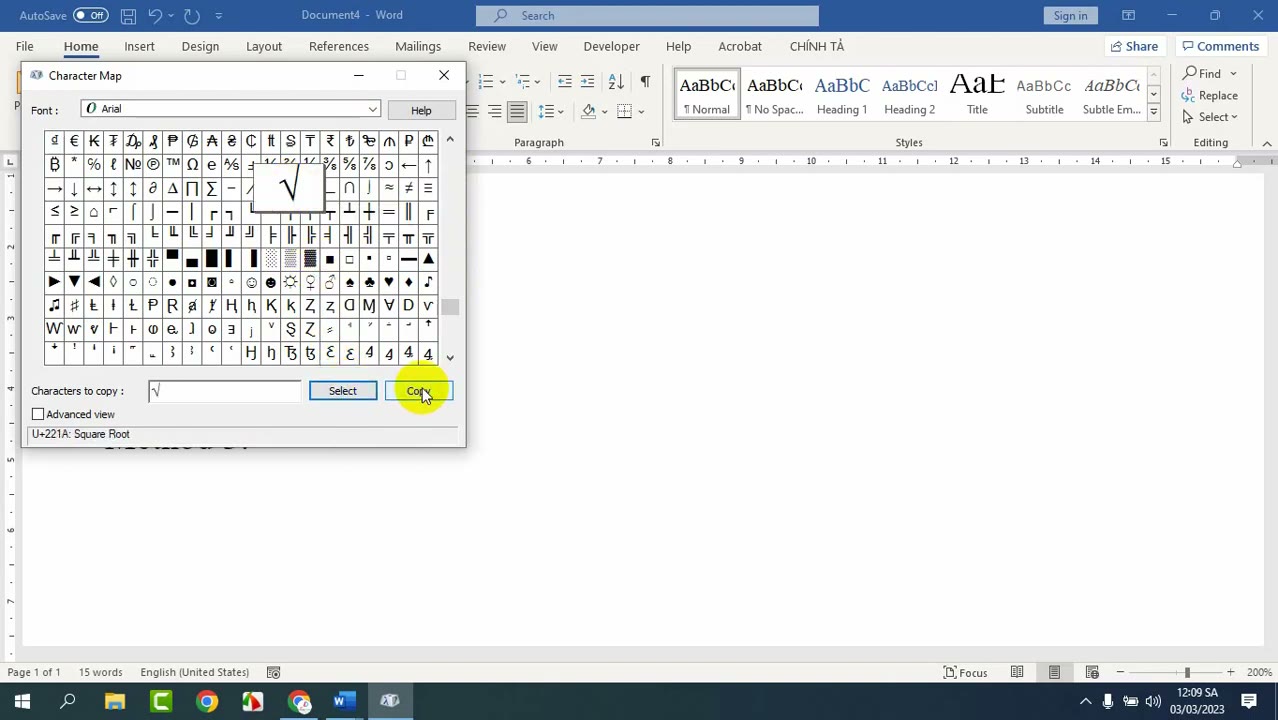
Method 3 — Character Map 1. Search for "Character Map" in the Start menu. 2. Find U+221A (search "square root" or scroll to Mathematical Operators). 3. Click Copy, then paste.
Mac
Method 1 — Keyboard Shortcut (fastest) Press Option + V in any app. √ appears instantly. This works system-wide — in Pages, TextEdit, any browser field, emails, everything.
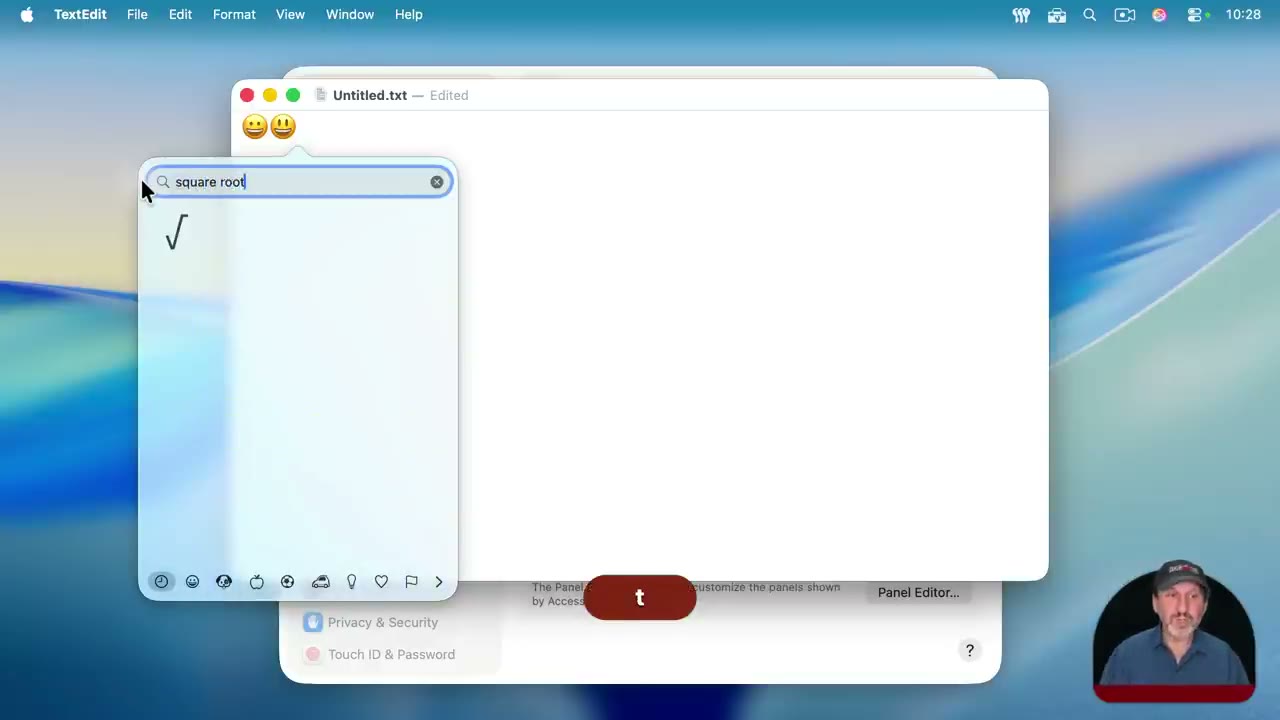
Method 2 — Character Viewer 1. Press Control + Command + Space to open Character Viewer. 2. Search for "square root." 3. Double-click the symbol to insert it.
iPhone and iPad
iPhones have no built-in keyboard shortcut for √. The two practical methods are:
Method 1 — Copy and paste: Copy √ from this page and paste where needed. For quick reuse, save it in a note.
Method 2 — Text Replacement shortcut (permanent solution) 1. Open Settings → General → Keyboard → Text Replacement. 2. Tap the + button. 3. In Phrase, paste √. In Shortcut, type something like sqr or sqrt. 4. Save.
Now any time you type sqr on your iPhone keyboard, it auto-corrects to √.

Android
Android keyboards vary by manufacturer, but on most devices:
Method 1 — Copy and paste: The most reliable method. Keep √ in a note app.
Method 2 — Long-press the numbers key: On many Android keyboards, long-pressing certain keys reveals special characters including mathematical symbols. The exact location depends on your keyboard app (Gboard, SwiftKey, Samsung Keyboard).
Method 3 — Google Keyboard (Gboard): Tap ?123, then =\<, and scroll through special symbols to find √.
Linux (Desktop)
Method 1 — IBus / Compose key Press Ctrl + Shift + U, type 221a, then press Enter or Space. √ appears. This works in GNOME, KDE, and most GTK applications.
Method 2 — IBus Compose key: Set up a Compose key, then use Compose + s + q.
Microsoft Word
Method 1 — Alt+X (fastest in Word) 1. Type 221A (the hex code). 2. Immediately press Alt + X. 3. Word converts the code to √.
Method 2 — Insert Symbol 1. Click Insert → Symbol → More Symbols. 2. Set Font to "(normal text)" and Subset to "Mathematical Operators." 3. Find √ (or type 221A in the Character Code field). 4. Click Insert.
Method 3 — Equation Editor (for proper radical with vinculum) For √(a + b) with a proper bar over the expression: 1. Click Insert → Equation (or press Alt + =). 2. Click Radical in the Equation tab. 3. Select the radical template and type your expression inside.
This is the right method when you need the full radical sign with a bar extending over multiple terms. The plain √ character is for simple, single-value roots only.
Important: Word has no built-in keyboard shortcut assigned to √ by default. The 221A + Alt+X method is the fastest native approach.
Microsoft Excel
For √ in Excel, it depends on what you actually need:
To display the √ character (not calculate)
- Use Alt + 251 (Num Lock + numpad) to type √ directly into a cell.
- Or use the formula =UNICHAR(8730) in a cell — returns √ as text.
- Or paste the character from this page.
To calculate the square root of a number
- Use =SQRT(number) — for example, =SQRT(25) returns 5.
- Or use =number^(1/2) — for example, =A1^(1/2) returns the square root of the value in A1.
- Or combine both: =UNICHAR(8730)&TEXT(A1,"0") displays "√25" as text (not a live calculation).
To insert √ into a formula label
Use =UNICHAR(8730)&" of "&A1 to create display text like "√ of 25."
Google Docs
Method 1 — Copy and paste: Paste √ directly from this page. Works in any cell or document.
Method 2 — Insert → Special Characters 1. Click Insert → Special characters. 2. Search "square root" or draw the symbol. 3. Click to insert.
Method 3 — Equation editor For proper radical notation with vinculum: 1. Click Insert → Equation. 2. Click the radical template.
Google Sheets (Spreadsheets)
Same logic as Excel:
- To display √: paste the character or use =UNICHAR(8730).
- To calculate: use =SQRT(number) or =number^(1/2).
HTML and CSS
<!-- Named entity -->
√
<!-- Decimal entity -->
√
<!-- Hex entity -->
√
For a proper radical expression with a vinculum in HTML, CSS cannot extend the bar over text with the √ character alone. Use MathML or render with LaTeX (MathJax/KaTeX):
<!-- MathJax LaTeX (renders √(a + b) with proper bar) -->
\(\sqrt{a + b}\)
LaTeX
% Square root
\sqrt{x}

% Square root of an expression
\sqrt{a + b}

% Cube root (index 3)
\sqrt[3]{x}

% nth root
\sqrt[n]{x}

% Surd variant (no bar, only radical sign)
\surd
LaTeX renders the full radical sign with extending vinculum automatically — it is the professional standard for mathematical typesetting.
Programming Languages
In code, the radical symbol is never typed literally. Use the appropriate function:
| Language | Syntax | Example |
|---|---|---|
| Python | import math; math.sqrt(x) | math.sqrt(9) → 3.0 |
| JavaScript | Math.sqrt(x) | Math.sqrt(16) → 4 |
| Java | Math.sqrt(x) | Math.sqrt(25) → 5.0 |
| C / C++ | #include <math.h>; sqrt(x) | sqrt(49) → 7.0 |
| PHP | sqrt(x) | sqrt(36) → 6.0 |
| R | sqrt(x) | sqrt(4) → 2 |
| Ruby | Math.sqrt(x) | Math.sqrt(9) → 3.0 |
| Swift | x.squareRoot() or sqrt(x) | 9.0.squareRoot() → 3.0 |
If you want to display the √ symbol in a web page generated by code, use the HTML entities above or simply include the UTF-8 character directly in your string.
Common Mistakes When Using the √ Symbol
Mistake 1: Confusing √ with a check mark ✓
The characters look similar on screen, especially at small sizes. The technical difference: - √ (U+221A) is the mathematical radical sign — used in equations. - ✓ (U+2713) and ✔ (U+2714) are check marks — used for lists and confirmation.
If you search your phone's symbol keyboard for a tick mark and accidentally copy √, your maths will display correctly, but if you do the reverse and type √ in a checklist, it will look off.
Mistake 2: Expecting the bar to extend in plain text
The √ character is just the hook. When you type √9 in a text message or email, readers understand it. But when you type √9+16, readers may not know whether you mean √(9 + 16) = 5 or (√9) + 16 = 19. Use parentheses in plain text: √(9 + 16). For formal documents and typesetting, use an equation editor.
Mistake 3: Using √ as a calculation in spreadsheets
Pasting √ into an Excel or Google Sheets cell gives you the character, not a calculation. For calculation, you need =SQRT(number). The character and the function are two different things.
Mistake 4: Assuming √9 = ±3
The √ symbol means the principal (positive) square root. √9 = 3, full stop. If you need both roots, write ±√9.
Mistake 5: Typing the wrong Alt code
Alt + 251 gives √ (radical sign). Alt + 253 gives ² (superscript 2). These are adjacent code page entries in Windows code page 437, and students occasionally type the wrong one when working fast.
The √ Symbol vs. the ∛ and ∜ Symbols
The same Unicode block includes higher-order root symbols:
∛ (U+221B) — Cube root: The number whose cube equals the radicand. ∛8 = 2 because 2³ = 8.
∜ (U+221C) — Fourth root: The number whose fourth power equals the radicand. ∜16 = 2 because 2⁴ = 16.
For fifth roots and beyond, Unicode provides no dedicated symbol. Write the index as a small number inside the radical notch using an equation editor or LaTeX \sqrt[5]{x}.
HTML entities for all three:
| Symbol | HTML Named | HTML Decimal |
|---|---|---|
| √ | √ | √ |
| ∛ | — | ∛ |
| ∜ | — | ∜ |
Why Does the Square Root Symbol Look the Way It Does?
Students frequently ask why the symbol looks like a checkmark with a long bar. The shape has a genuinely interesting origin.
The hooked curve at the front evolved over roughly a century of manuscript copying. When medieval European scholars wrote the abbreviation for radix in lowercase cursive, the r gradually became more stylised — the loop closed off, the ascending stroke shortened, and what remained was a shape remarkably similar to a modern checkmark. The long horizontal bar was added later by Descartes in 1637 to serve the same grouping purpose as parentheses, so the reader would know which terms were inside the root.
In other words, the √ symbol is essentially a cursive lowercase r (for radix) with a vinculum (a bar) attached — a typographic evolution that happened to produce one of the most recognisable symbols in mathematics.
Real-World Uses of the Square Root Symbol
You will encounter √ in contexts far beyond the classroom:
Architecture and construction: The Pythagorean theorem (c = √(a² + b²)) is used constantly to calculate diagonal measurements, verify right angles, and size structural elements.
Finance: Volatility calculations in options pricing (Black-Scholes model) involve square roots. Standard deviation — a cornerstone of statistics — involves √.
Physics: The speed of sound in a gas, the period of a pendulum, the velocity reached in free fall — all involve √ in their formulas.
Computer graphics: Distance between two points in 2D space uses the distance formula d = √((x₂-x₁)² + (y₂-y₁)²). Every time a game engine checks whether a player is within range of an enemy, it is computing a square root.
Medicine and science: Body surface area calculations used in chemotherapy dosing involve square roots. So do many statistical tests in clinical research.
Audio engineering: The root-mean-square (RMS) calculation for audio levels and signal power involves √ at its core.
Frequently Asked Questions
What is the name of the √ symbol?
The formal name is the radical sign or radical symbol. In everyday use, most people call it the square root symbol or square root sign. The Latin root of the name is radix, meaning "root."
What is the Alt code for the square root symbol?
On Windows with Num Lock on and a numeric keypad, hold Alt and type 251 on the numpad. Release Alt to produce √. The Unicode code point is U+221A (decimal 8730), so you can also type 221A and press Alt+X in Microsoft Word.
What is the Unicode for the square root symbol?
Unicode U+221A. The HTML entity is √ or √. In UTF-8, the character is encoded as three bytes: E2 88 9A.
How do I type the square root symbol on a Mac?
Press Option + V in any application. This is a system-wide shortcut that works in every Mac app.
How do I type the square root symbol on an iPhone?
iPhones have no built-in shortcut. The fastest method: go to Settings → General → Keyboard → Text Replacement, add a shortcut (e.g., type "sqr" → phrase "√"). After saving, type sqr and it auto-corrects to √ everywhere.
How do I put the bar over the number in a square root?
The plain √ character is just the hook — it has no extending bar. For expressions where multiple terms are under the root, either use parentheses in plain text (√(a + b)) or use an equation editor (Insert → Equation in Word or Google Docs, or LaTeX \sqrt{a + b}).
What is the square root symbol in HTML?
Use √ (named entity), √ (decimal), or √ (hex). These all render as √ in any browser.
What is the difference between √9 and ±√9?
√9 = 3 (the principal root, always positive). ±√9 = ±3 (both the positive root 3 and the negative root −3). The √ symbol alone always means the positive root.
Who invented the square root symbol?
The symbol was first printed by German mathematician Christoph Rudolff in his 1525 algebra textbook Die Coss. It was based on the abbreviation for the Latin word radix (root). French mathematician René Descartes added the extending bar (vinculum) in 1637 in La Géométrie, giving the symbol the form used today.
How do I type the cube root symbol ∛?
On Mac: open Character Viewer (Control + Command + Space) and search "cube root." In HTML, use ∛. In LaTeX, use \sqrt[3]{x}. On Windows, use Character Map to find U+221B.